

renderflow module a plain Python step uses, packaged with a name, an icon and a manifest so other people can submit it without knowing where the script lives.
The folder
plugin.toml
Every plugin needs aplugin.toml beside main.py. It holds the plugin’s identity: its name, version, icon, author and the software it requires; main.py is always the entry point.
Where your scene comes from
A[submit] table says how a scene reaches your step. One key answers it, and one more says whether there is an application to open the scene in:
Pick
"in-app" when nothing outside the application can answer your fields: a Cinema 4D take, a Maya render layer, a tyFlow object in a closed .max.
open_in = true puts an open in <application> button beside the field, using the first entry in [requires]. Without a [requires] application there is nothing to open, and no button appears.
Declaring fields
Each declaration below is a field in the submitter and the value, from a single line:rf.folder("plates", ...) does two things at once:
- It declares a field in the submitter, labelled Plates, with a folder browser.
- It returns the value, right there on the line, so the script reads it as an ordinary variable.
rf reference: text, numbers, switches, choices, files, folders, resolutions, key-value pairs, a frame range, an output, and a sequence. A sequence field is how a plugin reads what an earlier step in the job wrote: the operator picks that step’s output, or browses to a sequence on disk, and the script gets the list of files either way.
Declarations run when the script is imported, and they return the operator’s value at that moment. So they belong at module level, not inside a function. A declaration inside
@rf.execute would be read once per item and would not appear in the submitter at all.Splitting work across machines
One script becomes many tasks because it says so.@rf.tasks returns a list, and every entry becomes one task:
@rf.execute is called once per entry with the entry itself.
An entry is anything JSON can carry, which is the point. A task does not have to be a frame or a file:
@rf.tasks runs on the machine that is submitting, before the job exists. It has to, because the farm needs the list to make the tasks. That also means it is the machine that can see the operator’s folders. Raising stops the submission with your message, and planning nothing is refused rather than becoming a job that never finishes.
Without @rf.tasks a script is a single run on a single machine, which is all a lot of plugins need.
The hooks
@rf.execute is the only one a script needs.
@rf.submit is the one worth knowing about. It runs on the artist’s own machine at submit time, before a job exists, so it is where you check the things that make a job pointless if they are wrong:
@rf.cleanup runs whatever happened, including after a failure, because a temporary folder and an open application are not conditional.
How the tasks are spread is one line on the decorated function:
on_error="continue" finishes the rest of a slice before failing it, for a batch where one bad file should not cost you the files after it.
When a task fails
A failed task stops its step.rf.Fatal, an uncaught exception and a non-zero exit all fail the task, and every other task of the step fails with it: the next one runs the same script and would fail the same way. Machines still rendering the step are stopped, and tasks already completed stay completed.
The job then fails, unless a later step is set to run on failure. Fix the cause and press Start, and the job renders what is left.
The one failure that does not stop the step is rf.AppNotFound, raised by rf.app() below: the machine is wrong, not the work, so the task moves to another machine.
Finding applications
rf.app() asks what this machine has installed, which is the only place that question has an answer. Many applications ship more than one binary, and path names which: Cinema 4D’s exe is the interface and its cmd is the command-line renderer, and a headless render wants the second.
When the machine does not have it, rf.app() raises rf.AppNotFound:
AppNotFound takes this machine out of this task, and the task runs somewhere else. It does not fail the job. A farm where only some machines have Nuke is a normal farm, and a script that asks for Nuke on a machine without it has discovered a fact about the machine, not an error.rf.tool() is different: ffmpeg, ffprobe, imager and python come with RenderFlow, so a script can rely on them without asking anyone to install anything.
Paths across machines
P:/shots/010. A Mac node mounts the same share at /Volumes/projects/shots/010. rf.path() returns the form this machine uses, through the rules in Settings → Mapped Paths: each rule names one location for Windows, macOS and Linux, and a path starting with any of them comes back in this machine’s form. A drive letter and a UNC path to the same share are two rules.
Call it on every path a field hands you before opening it: a rf.file, rf.folder or rf.output value arrives exactly as the artist’s machine wrote it. rf.list() and rf.sequence() already return mapped paths.
Requiring software
A requirement may only name software RenderFlow already detects; anything else is refused, with the advice to check for it in the script with
rf.app() instead, which requeues on another machine rather than pretending the farm knew about a tool it has never heard of. And python is a note about the interpreter for a reader, not something the farm matches.
Installing one
1
Open Settings, then Plugins
2
Press Add a plugin
3
Check the row
The plugin appears with its name and version. A plugin that failed to load is listed with the reason, never hidden.
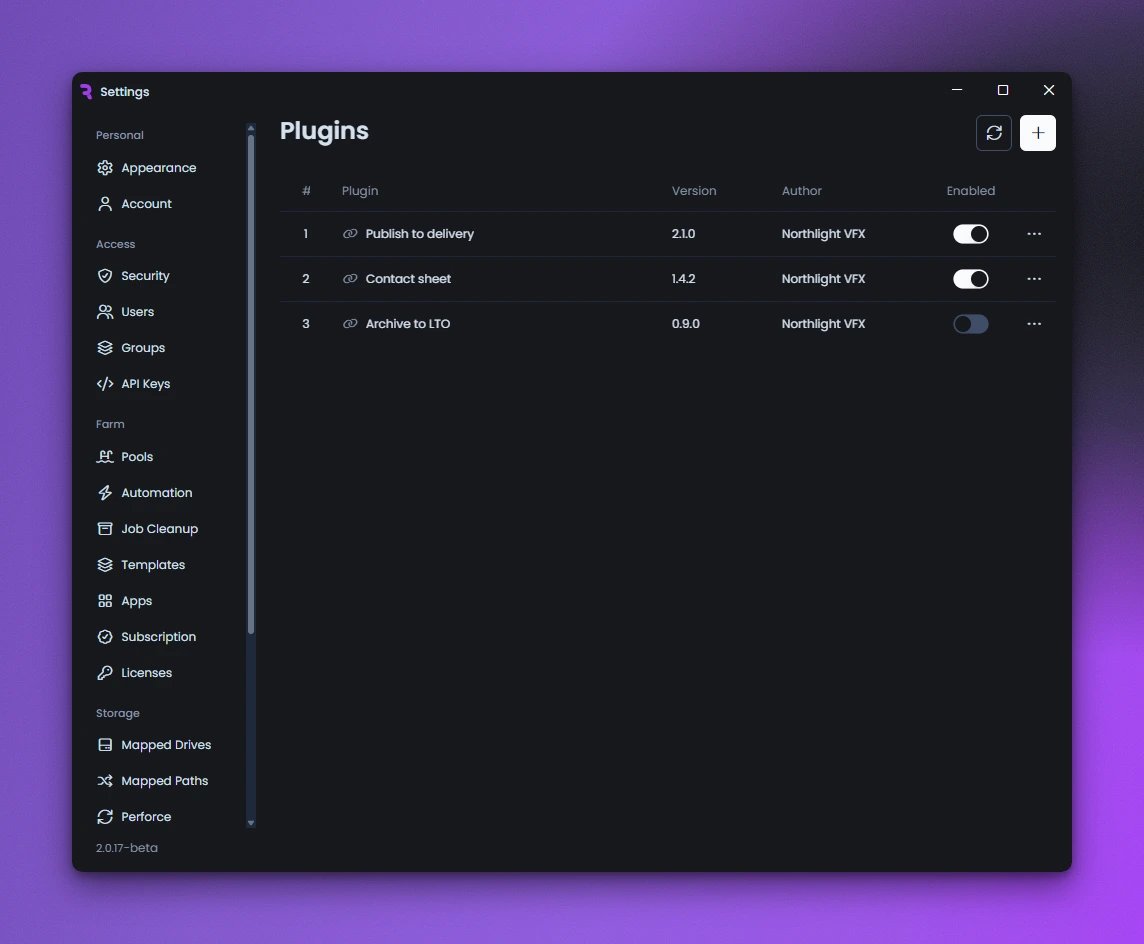
Settings, Plugins: a studio's own job types, one of them retired
How the submitter learns your fields
When a plugin is installed, the service runsmain.py in inspect mode and reads back what it declares. That is the same thing python main.py --rf-inspect prints, so what the submitter will show is something you can see in a terminal before anyone installs anything.
It also means a script that cannot be imported fails at installation rather than at render time.
Once it is installed, the plugin is a step type like any other, listed under Plugins with its version beside it:
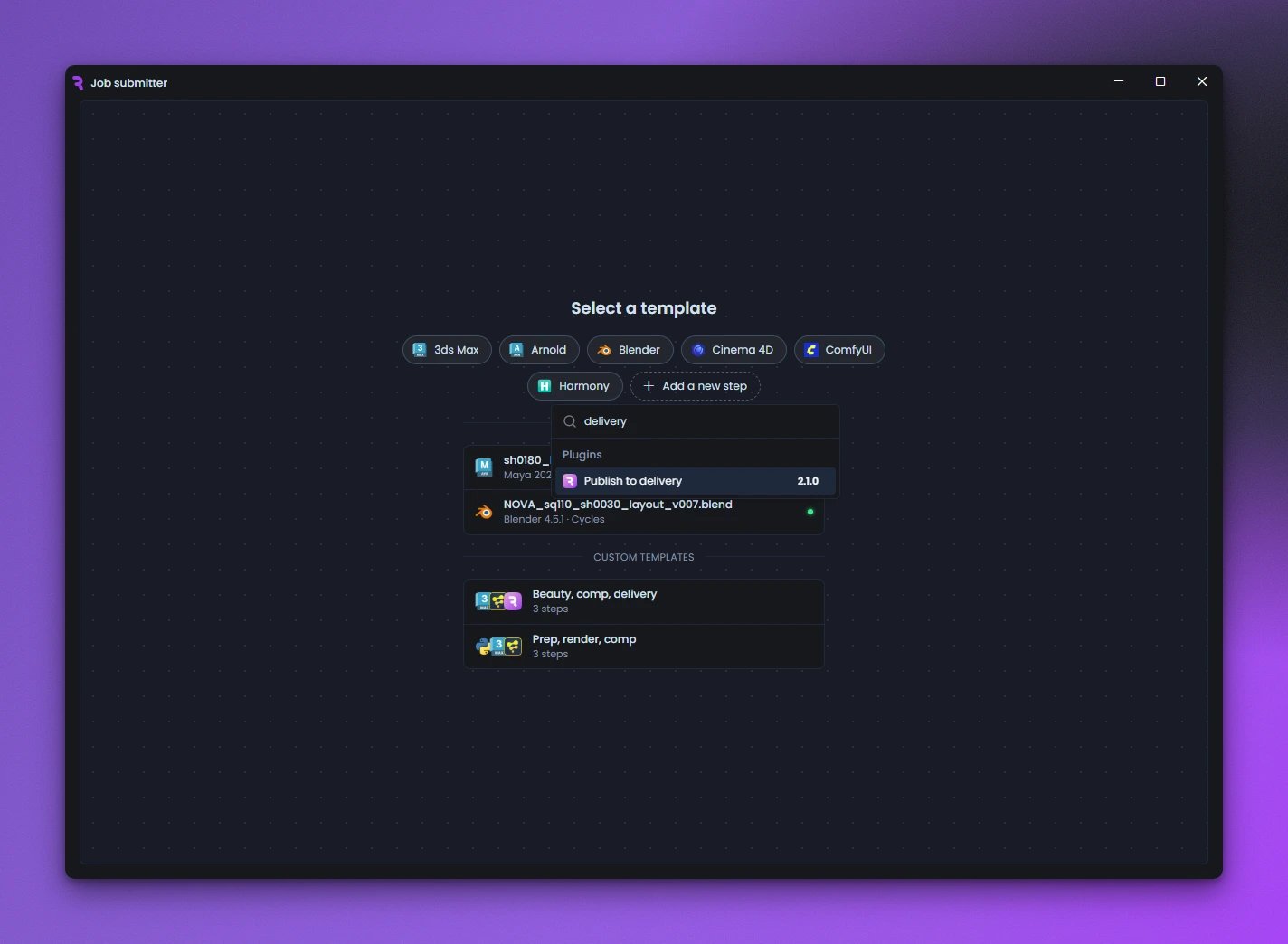
An installed plugin in the step list, beside the built-in types
main.py are the controls an artist fills in. rf.folder("delivery", label="Delivery folder", required=True) is the second row here, with its default already in the box:
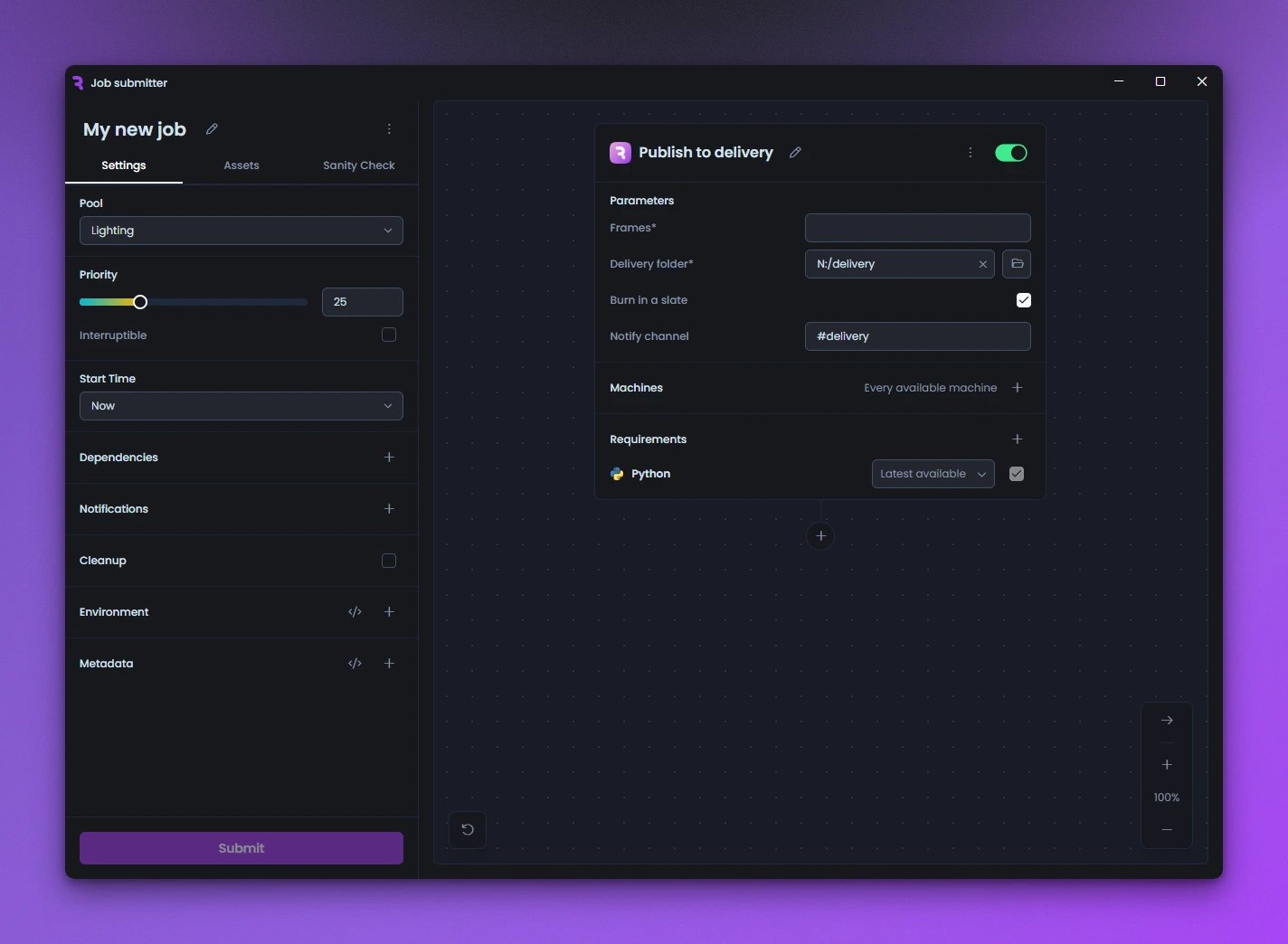
A plugin step: every control on it is a line of the script
Submit from code
A plugin job is a recipe like any other:id is required and version is optional: leave it out to take whichever version is installed, and the job pins whatever that was.
state is the plugin’s own, in whatever shape it likes. RenderFlow carries it and never looks inside. It reaches the script as rf.state, so a submitter you wrote inside a DCC can gather anything it can see there and hand it over:
rf.state.lut or "aces.cube" reads as “theirs, or a default”.
Submit from inside an application
Some answers only exist inside the application: which tyFlow objects a.max holds, which takes a Cinema 4D scene has. A script you run there can read them with the application’s own API and put them in a recipe. You do not have to build a submitter around it: send the recipe to open_submitter and RenderFlow opens its own, with the job and the scene’s properties already filled in. This is how the Submit to RenderFlow buttons in every supported application work.
The Python SDK needs nothing outside the standard library, so it runs in the application’s own Python:
fields can only narrow a field your script declares. It cannot add a field or change its type.
The job’s own settings go in the same recipe: pool_id and priority, and metadata, the labelled values the job carries, such as the artist or the render settings, each a label, a value and "type": "string".
SDK sample · Cinema 4D carries a complete one: submit_to_renderflow.py, run from Cinema 4D’s Script Manager, sends the open scene with its frame range, a pool, a priority and metadata.
The artist gets the full submitter, can change anything in it, and the job is created when they press Submit. When the RenderFlow app is not running on this machine, opened is false and reason says why. To skip the submitter and send the job straight to the farm, call farm.jobs.create_job(body=recipe) with the same recipe.
Example
A studio job type in under fifty lines. It renders a Cinema 4D scene, one frame per task, and reports the renderer’s own progress:@rf.tasks makes every frame one task. Without it the job is a single task.
With cinema4d = "2026" in [requires], only machines with that line get the work. rf.app() then starts the build pinned in the step’s requirements, or the newest one on the machine that took the task.
SDK samples
Five sample plugins come with RenderFlow, in thesdk/examples folder of the installation. The submitter lists them as SDK sample · Blender, SDK sample · Cinema 4D and so on. Add one in Settings → Plugins to try it, or copy its folder, change id and name in plugin.toml, and add the copy to make your own.